
Hands‑free
Auto Mode
Set it once, it runs itself on a screen all day.
Switch it on
In Control, open the
Self-Service Triviatab and set Status to On.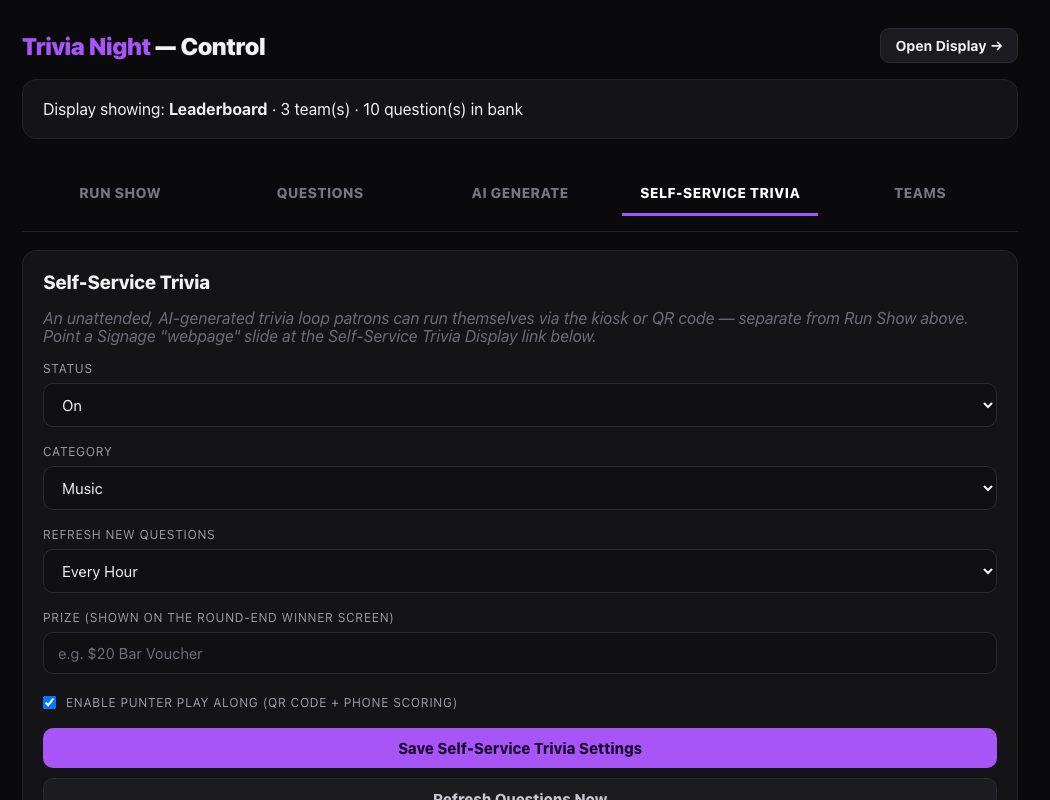
The Self-Service Trivia tab. Pick a category and a refresh rate
Choose one of the 8 categories, then decide how often it should pull a fresh AI batch —
HourlyorDaily.Turn on Play Along (optional)
A QR code appears on screen so punters can answer from their own phone. Add a prize (e.g. "$20 Bar Voucher") to flash up for the round's winner.
Save, then put it on a screen
Open
/trivia/autodirectly on the TV, or drop that same link into a SignageWebpageslide.Let it loop
12 seconds to answer, a quick reveal, next question. Every refresh, it pauses on that round's leaderboard and winner before starting fresh.
Still stuck?Send us a ticket and the JJJK team will get back to you.
Submit a ticket